App Intel

TV Remote for Sony TV

LiveDev Null4 apps · 8.4M installsEntertainmentFree · contains adstv.remote.control.sonytv

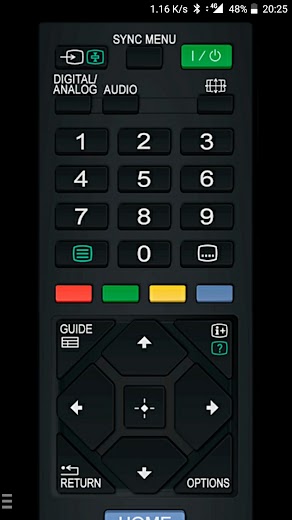
Fast, user-friendly and easy to use remote control app for Sony TV (WiFi + IR).

Alert me★ WatchOpen in Play ↗
Total installs
7,621,134
exact · Play shows 5,000,000+
Installs / day
0
since last crawl
Rating
4.5★
69.2K ratings · 3.5K reviews
Released
29 Dec 2017
8.8y ago
Last update
13 Jul 2026
v1.5.0 · 3mo ago
Countries
—
not checked yet

Install history

exact counter from Google Play
7.4M8.1M8.7M9.4M10M11 Oct12 Oct13 Oct

Installs per day · last 90 days

00.30.50.8112 Oct13 Oct13 Oct

Change timeline

Full history

No changes recorded yet. We compare every crawl with the previous one and list title, icon, screenshots, description, version, price and availability changes here.

Country availability

Availability has not been checked for this app yet. “Check all countries” looks the app up in about 140 Google Play storefronts and shows where it is live, listed but not installable, or missing — plus any country-specific (custom) store listings.

Top countries

Country data will be available soon.

We estimate where downloads come from using the app’s position in Google Play’s top charts in about 140 countries. This app is not in any chart we have collected yet; the estimate appears as soon as it is.

Top chart positions

Not in any tracked top chart.

App manifest

Read this app's manifest from Google Play: permissions, declared SDKs, components and AdMob app ID. Saved analysis appears here automatically.

Manifest analysis reads only the required APK ranges. Base APK downloads may need separate device splits to install.

Data safety

declared by the developer on Google Play
  • Shares data with third parties Device or other IDs
  • No data collected
  • Data is encrypted in transit
  • No way to ask for data deletion

This is the developer's own declaration, summarised from the Play listing. The permissions below show what the app is technically able to access.

Permissions

8 in 2 groups
0 Sensitive3 Notable5 Routine
Wi-Fi connection informationRoutine1

Access to details about Wi-Fi networks your device sees or uses

  • See whether Wi-Fi is on and details of the network you are connected toview Wi-Fi connections · ACCESS_WIFI_STATE
OtherNotable7

Access to miscellaneous device features that don't fit other categories

  • Receive data sent to all devices on your Wi-Fi network, which uses more batteryallow Wi-Fi Multicast reception · CHANGE_WIFI_MULTICAST_STATE
  • Connect to or disconnect from Wi-Fi networks and change saved Wi-Fi settingsconnect and disconnect from Wi-Fi · CHANGE_WIFI_STATE
  • Keep your phone's processor or screen from going to sleep, which can use more batteryprevent device from sleeping · WAKE_LOCK
  • Check whether you are online and whether you use Wi-Fi or mobile dataview network connections · ACCESS_NETWORK_STATE
  • Connect to the internet to load content and send datafull network access · INTERNET
  • Make your phone vibratecontrol vibration · VIBRATE
  • Use your phone's infrared transmitter to control TVs and other devicestransmit infrared · TRANSMIT_IR

Sensitive = can reach personal data, location, camera/mic or act on your behalf. Notable = changes how your device behaves. Routine = normal for almost every app. Source: Google Play's permission list for all versions of this app.

Store listing

Full description
With this app "Remote Control for Sony TV" you can use your smartphone to control your Sony TV. You can choose between network (WiFi / WiFi Direct / LAN) IP control or infrared (IR) control. ★ Infrared (IR) control Works on phones and tablets with built-in IR blaster (infrared port) such as Samsung Galaxy S series until S6, HTC ONE, LG G3/G4/G5, Xiaomi Mi / Redmi / Note, Huawei Mate / Honor and many more. No setup required. No WiFi required. It's ready to use (no need for pairing with the TV). - Tested on Samsung Galaxy series (S4 / S5 / S6 and Note phones and tablets excluding Galaxy S7 & S8 which do not have IR hardware) running on original Android 4.4+ firmware (not CM/LineageOS). - Also works on some older Samsung devices running on Android 4.1 - 4.2.2 - Please note that you must point your phone’s IR blaster directly at the TV. Usual working range is 4-10ft (1-3 meters, max ~5 meters). - With some phones in power saving mode or with almost empty battery the IR blaster might not work or range is less then 5ft (2 meters). ★ Network IP control (WiFi / WiFi Direct / LAN). - Make sure the Sony TV that you want to use is turned [On]. - Make sure your mobile device and TV are connected to the same local/home network. - When registering/pairing a Bravia TV, make sure that "Remote Device" / "Renderer" in the settings of TV is set to [On]. - If you have refused the registering/pairing confirmation message on your TV, then you can change your selection later in TV's settings (usually it's located at HOME / Settings -> Network -> Home Network Setup -> Remote Device -> Remote Device List). - If the TV was not found, then it is also possible to enter the TV's IP address manually. To find out you TV IP address go to TV [ Settings ] / [ Network ]. List of compatible TVs: 2011 models: XBR-HX92 series, KDL-HX92 series, KDL-HX82 series, KDL-HX72 series, KDL-NX72 series, KDL-EX72 series, KDL-EX62 series, KDL-EX52 series, KDL-EX42 series, KDL-EX32 series, KDL-CX52 series, KDL-CX40 series 2012 models: XBR-X90x series, KD-X900x series, XBR-HX95 series, KDL-HX95 series, KDL-HX85 series, KDL-HX75 series, KDL-NX65 series, KDL-EX75 series, KDL-EX65 series, KDL-EX55 series, KDL-EX54 series 2013 models: XBR-X90xA series, XBR-X85xA series, KD-X900xA series, KD-X850xA series, KDL-W95xA series, KDL-W90xA series, KDL-W85xA series, KDL-W80xA series, KDL-W70xA series, KDL-W67xA series, KDL-W65xA series, KDL-W60xA series, KDL-S99xA series 2014 models: XBR-X95xB series, XBR-X90xB series, XBR-X85xB series, KD-X95xxB series, KD-X90xxB series, KD-X85xxB series, KD-X83xxC series, KD-X80xxB series, KDL-W95xB series, KDL-W92xA series, KDL-W90xB series, KDL-W85xB series, KDL-W83xB series, KDL-W8xxB series, KDL-W7xxB series, KDL-W6xxB series, KDL-W5xxA series 2015 models: XBR-X94xC series, XBR-X93xC series, XBR-X91xC series, XBR-X90xC series, XBR-X85xC series, XBR-X83xC series, XBR-X80xC series, KD-X94xxC series, KD-X93xxC series, KD-X91xxC series, KD-X90xxC series, KD-X85xxC series, KD-X83xxC series, KD-X80xxC series, KDL-W95xC series, KDL-W85xC series, KDL-W80xC series, KDL-W75xC series, KDL-W70xC series, KDL-W600A series 2016 models: *KDL-W/WD, KLV-W Series (2016 model) are not compatible (except for KDL-W800D/W950D). 2017 models: *KD-X Series (2017 model) are not compatible. The purpose is not to replace the original TV remote, but this app is handy in emergency situations (original remote is lost, empty batteries etc). If this app doesn't work with your phone or TV then feel free to e-mail me (your exact TV and phone model). Then I can try to add support for your phone or/and TV model. Disclaimer/Trademarks: This app is NOT affiliated with or endorsed by Sony Corporation. Sony is a trademark of Sony Corporation.

What's new

- Added new customizable remote control layout - Updated Android SDKs

Growing in Entertainment

Category →