App Intel

WatchBack GainMore

LiveZK-ZeeStarZone1 app · 73 installsToolsFreecom.watchback.gainmore

Real creators watch your video and tell you what works. Feedback, not bots.

Alert me★ WatchOpen in Play ↗
Total installs
73
exact · Play shows 50+
Installs / day
0
since last crawl
Rating
—★
— ratings · — reviews
Released
10 Sept 2026
1mo ago
Last update
2 Oct 2026
v0.1.10 · 10d ago
Countries
—
not checked yet

Install history

exact counter from Google Play
71.378.585.792.810011 Oct12 Oct12 Oct

Installs per day · last 90 days

Not enough history yet — check back tomorrow

Change timeline

No changes recorded yet. We compare every crawl with the previous one and list title, icon, screenshots, description, version, price and availability changes here.

Country availability

Availability has not been checked for this app yet. “Check all countries” looks the app up in about 140 Google Play storefronts and shows where it is live, listed but not installable, or missing — plus any country-specific (custom) store listings.

Top countries

Country data will be available soon.

We estimate where downloads come from using the app’s position in Google Play’s top charts in about 140 countries. This app is not in any chart we have collected yet; the estimate appears as soon as it is.

Top chart positions

Not in any tracked top chart.

App manifest

Read this app's manifest from Google Play: permissions, declared SDKs, components and AdMob app ID. Saved analysis appears here automatically.

Manifest analysis reads only the required APK ranges. Base APK downloads may need separate device splits to install.

Data safety

declared by the developer on Google Play
  • No data shared with third parties
  • Collects data Personal info, App activity and 2 others
  • Data is encrypted in transit
  • You can ask for your data to be deleted

This is the developer's own declaration, summarised from the Play listing. The permissions below show what the app is technically able to access.

Permissions

2 in 1 group
0 Sensitive0 Notable2 Routine
OtherRoutine2

Access to miscellaneous device features that don't fit other categories

  • Connect to the internet to load content and send datafull network access · INTERNET
  • Check with Google Play that you got this app legitimatelyGoogle Play license check · com.android.vending.CHECK_LICENSE

Sensitive = can reach personal data, location, camera/mic or act on your behalf. Notable = changes how your device behaves. Routine = normal for almost every app. Source: Google Play's permission list for all versions of this app.

Store listing

Full description
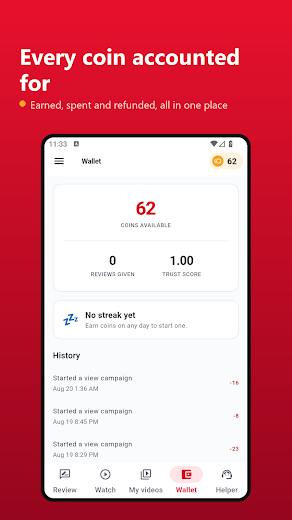
Getting honest feedback on your videos is hard. Friends are too kind, comments are too short, and nobody tells you the thing you actually need to hear. WatchBack GainMore is a community of creators who watch each other's work and say what they really think. HOW IT WORKS Watch another creator's video and earn coins. Spend those coins to get your own video in front of other creators. That's the whole idea — you give before you take, so everyone in the queue has already done the work. You get 60 coins free when you join — enough to put your first video in the watch queue straight away. WRITTEN FEEDBACK Ask for feedback and other creators watch your video and answer real questions: Did the opening hold you? Is the thumbnail working? How's the audio? Would you watch more? This is the part worth your time. Four honest strangers telling you your intro runs too long is worth more than a thousand views, because it's the thing you can actually fix. WATCH TIME Post your video and other creators watch it for a set number of seconds that you choose. We check the video really played — not that a screen was open. TIKTOK AS WELL AS YOUTUBE The same exchange works for TikTok. Paste the link from TikTok's Share button and other creators watch it, on a phone or on the television. One wallet covers both — coins earned watching a YouTube video pay for a TikTok, and the other way round. SEE WHAT ACTUALLY HAPPENED Every campaign gets a report: how many people watched, how long they stayed on average, how many watched to the end, and how many left early. Most apps like this show you a number and nothing else. We show you the truth, including when it isn't flattering. BUILT FOR YOUR PHONE AND YOUR TV Android TV is a real version of the app, not a phone screen stretched out, and the remote drives all of it. On the television you watch and earn, watch Reels and TikTok, see how your own videos are doing, and check your wallet. Long videos are only offered there, because that is where anyone would want them. Posting a YouTube video and writing feedback stay on the phone. Both mean typing, and a remote is a poor tool for that. A TikTok can be posted from the television, because all it needs is a short link. It is one account and one wallet across both — earn on the sofa, spend it in the morning. WHAT WE DON'T DO We don't sell subscribers, and we never pay anyone to subscribe. It's against YouTube's rules and it quietly damages your channel — subscribers who never watch tell YouTube your videos are boring, and it stops recommending them. We don't promise your views will count on YouTube. YouTube decides that, and we won't pretend otherwise. We don't need your YouTube password. We only ever need a link to a video. We cannot post, comment, or subscribe as you. There's no way to turn coins into money. They exist to keep the exchange fair, nothing else. FAIR BY DESIGN There's a daily earning limit, because this should be creators helping each other, not a device left running overnight. You'll always be told why something happened rather than left guessing. Not affiliated with or endorsed by YouTube, TikTok or Google.

What's new

• Android TV: sign in with your phone (scan the QR code), or with your remote: an emailed code, or a password (members only). • Android TV: whatever the remote is on turns red. Posting a TikTok works again. • TikTok: turn a sideways video upright, or fill the screen (View button). • My interests: choose as many as you like; For me shows only those. • Refresh button. Press Back twice to exit. • Privacy: the app now keeps a random installation ID (see the privacy policy).

Growing in Tools

Category →