
- Total installs
- 1
- Installs / day
- —
- Rating
- —★
- Released
- 14 May 2026
- Last update
- 25 May 2026
- Countries
- —
Install history
exact counter from Google PlayInstalls per day · last 90 days
Change timeline
No changes recorded yet. We compare every crawl with the previous one and list title, icon, screenshots, description, version, price and availability changes here.
Country availability
Availability has not been checked for this app yet. “Check all countries” looks the app up in about 140 Google Play storefronts and shows where it is live, listed but not installable, or missing — plus any country-specific (custom) store listings.
Top countries
We estimate where downloads come from using the app’s position in Google Play’s top charts in about 140 countries. This app is not in any chart we have collected yet; the estimate appears as soon as it is.
Top chart positions
Not in any tracked top chart.
App manifest
Read this app's manifest from Google Play: permissions, declared SDKs, components and AdMob app ID. Saved analysis appears here automatically.
Data safety
declared by the developer on Google Play- No data shared with third parties
- No data collected
- Data is encrypted in transit
- You can ask for your data to be deleted
This is the developer's own declaration, summarised from the Play listing. The permissions below show what the app is technically able to access.
Permissions
6 in 3 groupsWhat this app can do with your phone
- Use your camera to take photos and record videos
- Record sound using your phone's microphone
CameraSensitive1
Access to your camera to take photos and record video
- Use your camera to take photos and record videostake pictures and videos ·
CAMERA
MicrophoneSensitive1
Access to your phone's microphone to record sound
- Record sound using your phone's microphonerecord audio ·
RECORD_AUDIO
OtherNotable4
Access to miscellaneous device features that don't fit other categories
- Keep your phone's processor or screen from going to sleep, which can use more batteryprevent device from sleeping ·
WAKE_LOCK - Check whether you are online and whether you use Wi-Fi or mobile dataview network connections ·
ACCESS_NETWORK_STATE - Connect to the internet to load content and send datafull network access ·
INTERNET - Check with Google Play that you got this app legitimatelyGoogle Play license check ·
com.android.vending.CHECK_LICENSE
Sensitive = can reach personal data, location, camera/mic or act on your behalf. Notable = changes how your device behaves. Routine = normal for almost every app. Source: Google Play's permission list for all versions of this app.
Store listing


Full description
What's new
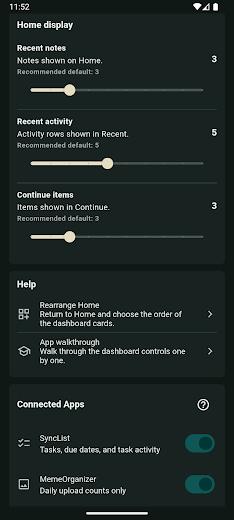
TaskHarmony Home is now available! • See your TaskHarmony day in one focused dashboard • Review today’s tasks, calendar items, notes, and recent activity • Create notes, tasks, and voice task drafts quickly • Connect with SyncList and other TaskHarmony apps • Customize your Home layout, display limits, theme, and language
Growing in Productivity
Category →굿로드ecobank · Productivity—/day · 3.8K total
Number to word converterHaider Ali Abdullah · Productivity—/day · 8.2K total
Orto Mio RivenditoriAxterisco - The Web Company · Productivity—/day · 3.6K total
Propr TeamPropr Pty Ltd · Productivity—/day · 2.1K total
Marul AIKarakuş Tech · Productivity—/day · 392 total
Tap Task Trackerdbyrne2000 · Productivity—/day · 13 total
AJ Blosenski, Inc.AJ Blosenski Inc · Productivity—/day · 2.6K total
Instant9: T9 App & Dial SearchSatpura Labs · Productivity—/day · 36 total